
You have your radio setup, and you are ready to make some contacts!
If your radio is not set up yet, try the setup page here: HOW TO SET UP FT8
First, open your WSJTx, have your radio on, and your frequency on the standard FT8 frequency. If everything is set up correctly, you will start to decode signals in the left pane.
The left pane is all the decoded messages.
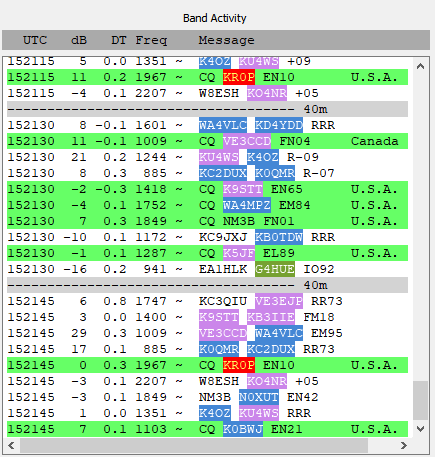
Ignore the colors for now. We will set that later. From left to right, here is the meaning of the numbers:
Time, Signal Strength, time offset from your clock, frequency in the FT8 passband, Message, assumed country
The signal strength of FT8 is measured from -25 to +35. FT8 can decode reliably if the signal is -18 and above.
You will notice the lack of ‘fake messages’ like in PSK and RTTY. This is by design. FT8 has error correction built in. Makes the mode slower but more reliable. FT8 will still have false decodes, ghost messages from impossible callsigns. But they are greatly reduced because of this error correction.
FT8 Conversation Pattern
In order to get through the standard FT8 exchange, you should know what the standard exchange is. I will use my callsign and a former callsign. The green background is me, the red background is the responding station.
CQ WC7L CN85
WC7L N7CTB DM01
N7CTB WC7L -05
WC7L N7CTB R-11
N7CTB WC7L RR73
WC7L N7CTB 73
Each of these messages is 15 seconds long, so it could be done in 1-1/2 minutes. After a full QSO is complete, WSJT will end the final transmission and stop. If you want to transmit more, you will need to interact with it again.
Once the QSO is complete, WSJTx brings up a prepopulated logging window. If you have it interfaced with your logger, when you hit ok, it will log into your normal log.
REPEAT?
Sometimes the station will not hear one of your messages. This is very common. Most operators will try a few times to complete the contact before moving on. It is not personal- the band conditions may have faded, and you may try again later.
WSJTx wants to complete the contact, and it will retransmit the message until the next in the sequence is heard. It will continue to transmit that message, even if the other operator has stopped. If you want to stop, just click the Enable transmit button. It will stop after the 15-second message is complete.
When you are ready to start making contacts:
MAKE SURE THE HOLD TX IS SET TO ON!
When you are responding to CQ messages, the default WSJTx will hop frequency to match the transmitting station. This is annoying at best and QRM at worst. Especially for DX stations. As you can see, you can decode anyone in the FT8 window; you don’t need to change your frequency to be heard.
Start Working FT8
Now, find a station calling CQ. Double-click on the message. Your radio will start transmitting and try to complete the contact. It
On the right-hand side, click the Generate Messages button.
FT8 Tricks
Colors!
In the picture above, you will notice several colors. These colors are very helpful in ensuring to not get the same operator in your log over and over. You can color stations you do not have in your log, grids you do not have in your log, and countries/continents you do not have. All of this is in the colors tab under settings.
If someone is calling CQ DX, don’t respond. They want DX stations. Besides, there are lots of others who would rather have contact with you.
Periodically check the waterfall to make sure that you are not on the same frequency as another. Just stop transmitting for a cycle to check. Personally, I set the waterfall to the fastest speed, it makes it easier to see stations on the waterfall.
Check to see how well you are being received: https://pskreporter.info/pskmap.html
If you notice signal reports in the positives, that means that CW and voice contacts may be possible.
If a station is calling CQ but is not responding to you, you may want to move somewhere else on the waterfall. There may be another operator there that you can not hear.
Looking to get that rare DX? Try this page: FT8 & DX
Want to use WSJTx for experimentation, or want to see how good your antenna is? Try this page: WHAT IS WSPR?