
You need these things to successfully program your radio:
Radio programming cable – these are radio-specific
PC with Windows 10 or newer, macOS Big Sur or newer, or most Linux Distros
*Repeater Database with repeater info (Frequency, PL tone, offset) – This can be downloaded inside Chirp*
OR
Local repeater guide – Some clubs publish local repeater info
The first step to programming your radio is to determine where you are going to be operating. If you plan to use your radio in Seattle, it doesn’t make sense to program repeaters in Idaho.
The next step is to determine what model of radio you have. This will determine how you program your radio.
If your radio was built within the last 15 years, it will probably be easiest to use your computer to program it. We will also assume it is a monoband 2M, 70cm, dualband 2M/70cm, or tri-band radio. DMR radios should not use Chirp.
If your radio is one of these models, use Chirp to program it:
Baofeng
B-Tech
Radioddity
Quansheng
Wouxun
Other Chinese brands
*Some Yaesu, ICOM, Kenwood, and Alinco radios may work with Chirp. But you should be aware that this may void your warranty.*
First, download and install Chirp from here: https://chirpmyradio.com/projects/chirp/wiki/Download#
Connect your radio to the programming cable and plug it into the PC.
Turn on the radio.
You may need to go to Device Manager, USB, and then take note of the COMM port that the radio is using.
Open Chirp, click ‘Radio’ on the top toolbar, then click ‘Download From Radio’.
With this file open, click ‘Radio’ -> ‘Query Data Source’-> ‘Repeaterbook.com’.
A dialog box will open. Here is an example:
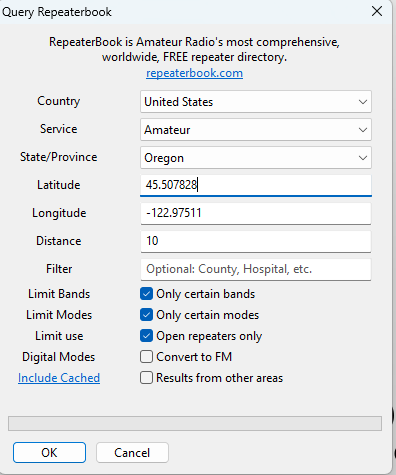
Use this website to find your Latitude and Longitude https://www.latlong.net/
Make sure to limit the bands that your radio can receive.
Click ‘Radio’-> Upload to Radio
Your radio may be loading. Once it is finished:
Unplug your radio, Turn it off and turn it back on.
*Baofeng UV5R radios have a channel mode and a frequency mode. Press the VFO/MR button (the orange/red one)*
Test on a local repeater by pressing the PTT button and saying your callsign. You should hear the repeater acknowledge.
Programming via the keypad
I generally discourage this, unless for small adjustments or repeaters not on repeaterbook.
This is a generic guide; specifics on how each radio does this can be found online
First, find the repeater frequency, set your VFO to this frequency – This is your receive frequency
Go into the menu and set the offset type (+ or -) and the offset amount – This is your transmit frequency
Set the PL tone; this notifies the repeater that someone is trying to use the repeater
If the repeater does not sense the PL tone, it will not rebroadcast your transmission
Save the memory in your radio
Test the new memory by pressing the PTT button
Related Articles:
Understanding Radio Repeaters
Talk to the ISS and other Ham SATS
How to Join a Net